
Set up your Mantel
About five minutes. You need your phone and your home Wi-Fi password.
-
Switch it on
On the back there's a small switch labeled Battery. Slide it to ON. It's the step people miss: with it off, the frame only works while plugged in.
Charge it with any USB-C phone charger. It works while it charges.
New frames often arrive with this switch off. Check it first.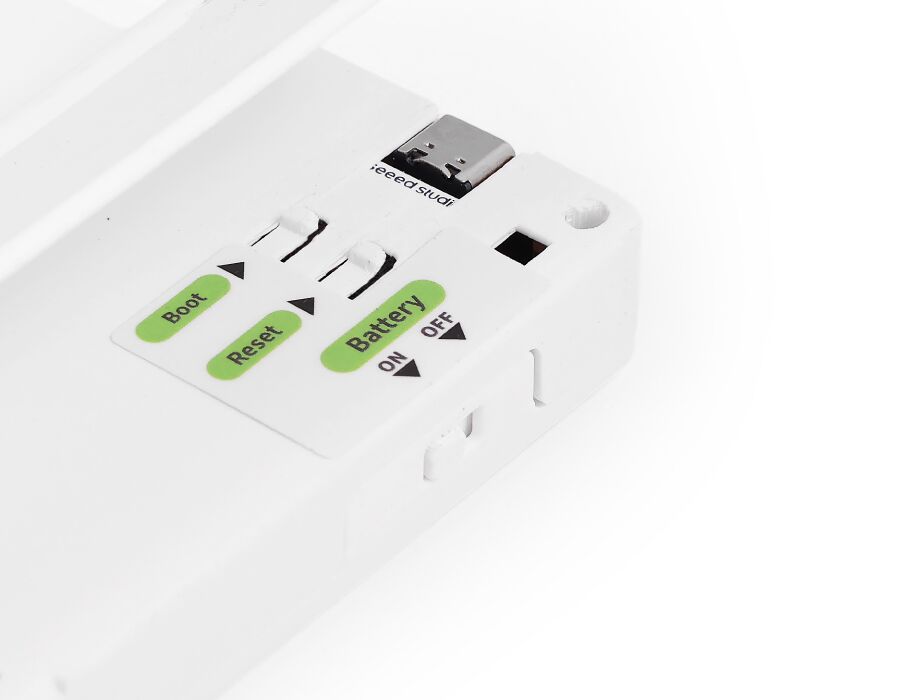
-
Join its Wi-Fi from your phone
- Open your phone's Wi-Fi settings.
- Join the network named Mantel-XXXX (the last four characters are different on every frame).
- A setup page opens by itself. If it doesn't, open your browser and go to 192.168.4.1.
- Pick your home Wi-Fi and type its password.
Your phone switches back to your usual Wi-Fi when you're done.
-
Scan the code on the screen
Once it's online, the frame shows a QR code. Scan it with your phone's camera, sign in, and give your frame a name, like “Kitchen.”
Can't scan it? Go to this page and type the code shown under the QR.
-
Connect your AI
One minute, then ask for anything, like “A note for the dog sitter.”
Connect your AI
If something's off
I don't see the Mantel-XXXX network
Make sure the battery switch is ON, or plug the frame in. Then hold the button on the back for 5 seconds. Setup starts again and the network shows up within a minute.
I picked the wrong Wi-Fi or typed the password wrong
Hold the button on the back for 5 seconds to restart setup, then join Mantel-XXXX again and choose the right network.
The frame says “offline”
Check the battery switch first, then plug it in with USB-C in case the battery is empty. If your Wi-Fi changed, hold the button for 5 seconds to set it up again.
My home Wi-Fi isn't in the list
Mantel needs a 2.4 GHz network. Most routers have one; it may be listed with “2.4” in its name.
Still stuck
Email support@mantel.ink and tell us what the frame's screen shows. A photo helps.